
Quick Summary
Preventing key fob battery failure comes down to protecting the battery from heat, cold, moisture, and frequent button presses. Keep the fob dry, away from hot dashboards and loose metal, and replace the battery when low-battery symptoms appear.
- Heat, cold, moisture, and frequent button presses are the most common triggers of failure.
- Do not leave the fob on the dashboard or in a hot car.
- Store the fob apart from loose coins and keys that can press on the buttons.
- Keep the fob several feet from the vehicle when you are not using it.
- Check battery orientation and clean the contacts if the fob fails after a new battery.
Table of Contents
- How Key Fob Batteries Fail and What Triggers It
- Key Fob Battery Symptoms to Watch For
- How Long a CR2032 Battery Lasts in a Key Fob
- Key Fob Battery Storage Tips That Extend Battery Life
- Step-by-Step Battery Replacement Without Losing Programming
- Why a Key Fob Still Fails After a New Battery
- When to Replace the Battery and When to Call a Professional
- Frequently Asked Questions
How Key Fob Batteries Fail and What Triggers It
Most key fob batteries fail because of heat, moisture, and everyday wear, not because the battery is simply old. Knowing the triggers is the first step to preventing failure.
Several common habits drain the battery faster than it should. Keeping the fob close to the vehicle for long periods can keep the signal active and wear the cell down. Leaving the fob in a hot car, a pocket with loose coins, or a damp gym bag all add stress to the battery and its contacts.
Here are the most common triggers:
- Heat exposure: Dashboards and parked cars in summer can reach temperatures that shorten battery life.
- Cold exposure: Very low temperatures reduce the battery's output and can cause sudden failure.
- Moisture: Water or sweat can corrode the contacts inside the case.
- Frequent button presses: Pressing buttons repeatedly, especially with no nearby vehicle, uses up power.
- Dropping the fob: Impacts can crack the seal, letting dust and moisture in.
A common mistake is assuming the battery lasts forever once installed. In practice, the battery is one of the most replaceable parts of the fob, so checking it on a schedule is worth the effort.
Key Fob Battery Symptoms to Watch For
A weakening battery usually shows warning signs before it dies completely. Catching these early lets you replace the battery on your own schedule instead of during a lockout.
Watch for these signs:
- The driving range is shorter than normal when you use the remote.
- You have to press the button several times or stand closer to the car.
- The dashboard shows a "key not detected" or "low battery" message.
- The remote works only sometimes, often in the same spot.
- The car's lights or horn do not respond when you press the lock button.
Remember that a weak battery is not the only cause of these problems. A dirty fob, a damaged button, or a signal problem can produce the same symptoms. If a fresh battery does not solve the issue, the fob may need further diagnosis.
How Long a CR2032 Battery Lasts in a Key Fob
Most key fobs use a CR2032 coin cell, and many owners ask how long one should last. The honest answer is that it depends on how the fob is used and stored. Replacement intervals vary, so a practical approach is to replace the battery when symptoms appear or on a regular schedule you set for your own vehicle.
Several factors affect how long the battery lasts:
- How often you press the buttons
- Whether the fob stays close to the vehicle for long periods
- Temperature extremes where the fob is kept
- The quality of the battery you install
Because the answer varies, a practical approach is to replace the battery when symptoms appear or on a regular schedule you set for your own vehicle.
Key Fob Battery Storage Tips That Extend Battery Life
Storage habits make a real difference in how long a battery lasts. Small changes can prevent early failure.
- Keep it dry. Store the fob away from sinks, rain, and sweaty gym gear.
- Avoid extreme heat. Do not leave the fob on the dashboard or in a hot car.
- Keep it away from metal. Store it apart from loose coins and keys that can press on the buttons.
- Stay out of the cold. Keep the fob indoors during winter instead of in an unheated vehicle.
- Move the fob away from the car when parked. Keeping it several feet from the vehicle when you are not using it can reduce unnecessary signal activity.
Inspect the battery compartment occasionally for corrosion or dust, since both can interfere with the signal.
The article's storage advice comes down to a few habits that protect the battery, summarised below.
| Storage habit | Why it helps | Avoid |
|---|---|---|
| Keep it dry | Moisture corrodes contacts | Sinks, rain, sweaty gym bags |
| Avoid extreme heat | Heat shortens battery life | Dashboard or hot car |
| Keep it away from metal | Coins can press the buttons | Loose coins and keys |
| Stay out of the cold | Cold reduces battery output | Unheated vehicle in winter |
| Store it away from the car | Limits unnecessary signal activity | Keeping it close while parked |
Step-by-Step Battery Replacement Without Losing Programming
Replacing the battery is usually a simple job you can do at home. The steps below help you avoid the most common problem: losing the fob's programming.
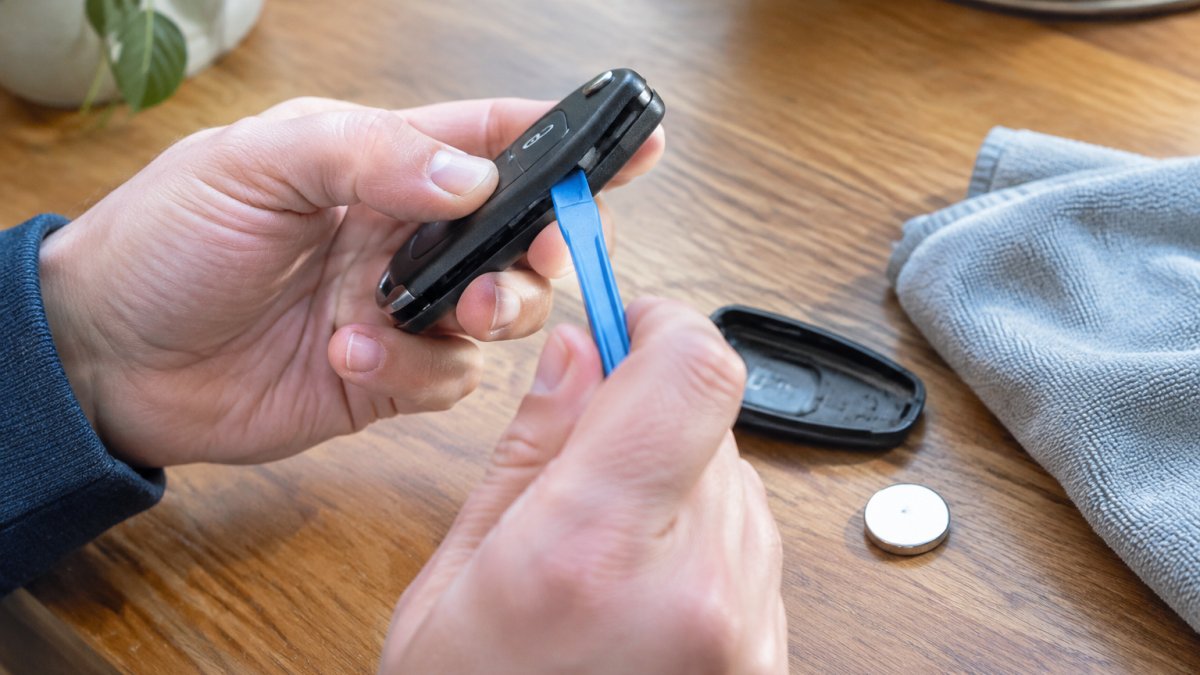
What you'll need: a fresh CR2032 battery, a small flat tool such as a plastic pry tool or a flat screwdriver wrapped in cloth, and a clean, soft surface.
Step 1: Open the fob carefully. Work over a table with a soft cloth. Gently pry the case apart at the seam, using the flat tool. Avoid forcing it, since a cracked case lets in moisture.
Step 2: Note how the battery sits. Look at which side faces up before you remove the old battery. The positive side usually faces up, but check your fob, since the orientation can differ.
Step 3: Swap the battery. Slide out the old cell and insert the new one in the same orientation. Avoid touching the contacts with your fingers, since skin oils can reduce conductivity.
Step 4: Test before closing. Press a button to confirm the fob responds. If it does, close the case and press the seam together until it clicks.
Step 5: Check the vehicle. Stand near the car and test the lock, unlock, and trunk functions. If you are locked out with a dead fob while you swap the battery, learn where to place a dead fob to start the car.
Expected result: the fob works normally, and no reprogramming is needed. If it does not respond, check the battery orientation and the contacts before assuming the fob is damaged.
Why a Key Fob Still Fails After a New Battery
Installing a new battery does not always fix the problem. If the fob still fails, the cause may be a damaged component, a corroded contact, or a programming issue rather than the battery itself.
Check these possibilities:
- Battery orientation: A reversed battery will not power the fob.
- Contact corrosion: Clean the contacts gently with a dry cloth or a cotton swab.
- Cracked case or circuit damage: Visible damage can break the connection.
- Signal interference: Other electronics or metal objects nearby can block the signal.
- Programming loss: Some fobs lose pairing after a battery change on certain models.
If none of these fixes the problem, the fob may need programming or a diagnostic check. Read the full troubleshooting steps and backup start methods for more options. A professional can test the fob and the vehicle's receiver to find the cause. Check whether your model can be programmed yourself or needs a locksmith.
When to Replace the Battery and When to Call a Professional
Use this checklist to decide your next step:
- The fob shows low-battery symptoms, and the battery is over a year old: replace the battery.
- The fob still fails after a fresh battery and correct orientation: check contacts and case damage.
- The case is cracked or the circuit looks damaged: have it inspected.
- The fob works only in certain spots or never responds: call for diagnostics.
- You are locked out or the car will not start: request professional service.
If your fob still won't work after the battery swap, Dealerkeys can help. Request service online for lockouts, lost keys, spare keys, and programming, covering cars, trucks, motorcycles, and more across East Tennessee.
Frequently Asked Questions
Why is my car key fob battery draining so quickly?
Rapid drain is often caused by the fob staying in constant signal contact with the vehicle, which happens when it is stored within close range of the car, such as on a kitchen counter next to a driveway window or in a pocket at home. Pressing buttons unintentionally, such as when the fob is stored in a bag or purse, also uses power. Corrosion on the battery contacts or a low-quality replacement cell can add to the drain. Store the fob at a distance from the vehicle when parked, keep it away from heat sources, and check the contacts for residue during battery changes.
How long does a CR2032 battery last in a key fob?
Most CR2032 batteries in key fobs last roughly one to two years, though published guidance varies. Replacement intervals vary by source and by use. Actual life depends on how often the fob is pressed, how close it is kept to the vehicle, and the quality of the cell. If the fob's range is shrinking, replacing the battery sooner than the typical interval is a reasonable precaution.
What should I do if my key fob stops working with a new battery?
Confirm the battery is seated correctly with the positive side facing the correct direction and that the contacts are clean. Check that the battery itself is fresh and genuine, since lower-quality cells may not perform well. Try the fob close to the vehicle, and check for moisture or damage inside the housing. If the fob still fails, the issue may involve the fob's electronics or the vehicle's receiver, and a professional diagnostic can determine which. Dealerkeys offers on-site diagnostics and fob programming, and you can call for dispatch or visit the website for current pricing or a quote.
Can moisture or extreme temperatures damage a key fob battery?
Yes. Moisture can corrode battery contacts and enter the fob's circuit board, while extreme heat or cold can shorten battery life and affect internal components. Keep the fob dry, avoid leaving it on a dashboard in direct sun, and keep it out of freezing conditions where possible. If the fob has been exposed to water, remove the battery promptly, dry the housing, and inspect the contacts before reinstalling. Persistent failures after exposure may point to internal damage that requires professional repair.
 Add dealerkeys.com as a preferred source on Google →